hotel wi-fi solutions

    Private 5G Security: Closing the Identity Gap from Connection to Enterprise Application

    How ANTlabs brings mobile-network context and enterprise identity together to protect sensitive business resources

    Private 5G is transforming enterprise connectivity. From campuses and hotels to industrial facilities and distributed operational sites, Mobile Private Networks (MPNs) give organisations greater control over mobile coverage, performance and traffic separation. Network slicing further enables operators to tailor connectivity to different enterprise and application requirements.

    For customers handling sensitive business information, that connectivity foundation raises an important question: Does an authorised mobile connection also mean the person accessing an enterprise portal is authorised to use it?
    The answer depends on how closely mobile-network identity and enterprise access controls work together.
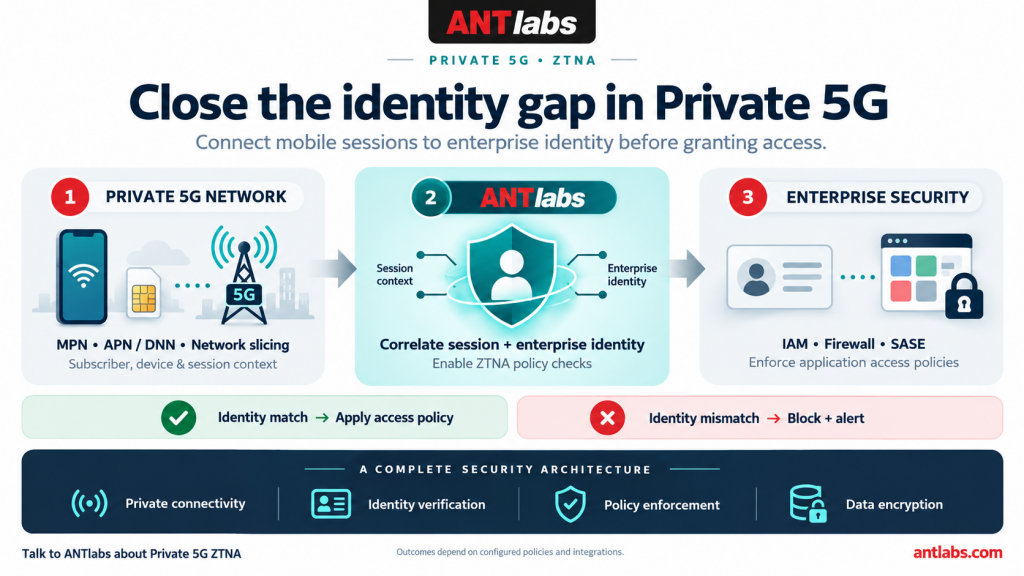
    ANTlabs helps close this identity gap by connecting private mobile-session context with enterprise Identity and Access Management (IAM). This enables access decisions to consider both the connection and the user, supporting a more complete security architecture from mobile access through to enterprise applications.

    Understanding the Security Gap in Private 5G

    Private 5G provides important security capabilities. SIM or eSIM authentication establishes the validity of a mobile subscription, while private APNs, DNNs and network slices can support enterprise-specific routing, traffic separation and service policies.
    However, these capabilities serve different purposes from enterprise user authentication and application authorisation.
    A valid subscription does not, by itself, establish which employee is currently using a device. Membership of an enterprise network slice does not determine whether that person should access payroll records, financial systems or an administrative portal.
    Where mobile-network and enterprise identity systems operate independently, several gaps can remain:

    • ·The connection and login may belong to different people. An authorised mobile session could be used to present another person’s shared, misused or compromised credentials.
    • ·Network access may be broader than the user’s role requires. Reaching the enterprise environment should not automatically provide access to every resource within it.
    • ·Mobile-session context may be absent from application access decisions. Enterprise controls may authenticate a login without checking its association with the active private mobile session.
    • ·Identity mappings can become outdated. Device reassignment, subscription changes and employee departures require corresponding updates to access policies.

    These are integration gaps that enterprises should assess in their deployment. Their significance depends on the controls already in place.
    The underlying Zero Trust Principle is clear: network location alone should not establish trust in a user or device. Access must be evaluated against identity and policy.

    ANTlabs Connects the Mobile Session to Enterprise Identity

    ANTlabs provides the identity-mapping and policy-enablement layer between the mobile network and the enterprise security environment.

    Depending on the deployment and available interfaces, mobile-network context can include the SIM’s subscriber identifier, device information such as the IMEI, and the IP address associated with the active session. ANTlabs correlates this context with the relevant enterprise user or group.

    Enterprise IAM supplies the complementary information: the user’s account, role, group membership and access permissions.
    Bringing these contexts together allows the security architecture to evaluate whether the mobile session and the identity presented at login are consistent with the enterprise’s authorized mappings. ANTlabs enables that context to inform the access decision, while integrated enterprise controls enforce the appropriate policy. Learn more about Private 5G

    A successful identity match is one input to that decision. Application permissions, authentication requirements, device posture and other configured conditions still apply.

    Preventing Access Under the Wrong Identity

    Consider an employee whose private 5G subscription is associated with their enterprise account. The employee connects through an authorised mobile session and attempts to access a sensitive finance portal. If the login corresponds to the authorized session-to-user mapping, the enterprise can evaluate the request against that employee’s role and the portal’s security requirements.
    Now consider the same connection presenting a different employee’s finance credentials. Without correlation between the two identity systems, the mobile network and the application could each accept their respective credentials without recognising the inconsistency.

    With an explicit identity-consistency policy and integrated enforcement, the mismatch can trigger a block and an alert before access is granted. This adds a valuable check against mistaken identity and credential misuse. For shared devices or pooled subscriptions, the organization must define the permitted user relationships and authentication requirements. A subscription identifier is useful security context; it is not proof of the person holding the device.
     

    Private 5G

    Building the Total Solution for Private Data Security

    An end-to-end private 5G security architecture needs coordinated protection across connectivity, identity, applications and data. The mobile network provides controlled connectivity and traffic separation. Enterprise IAM establishes user identity and permissions. Security enforcement platforms apply access decisions. Encryption protects data in transit, while endpoint and application controls address risks at either end of the connection.

    ANTlabs adds the connection between mobile-session context and enterprise access policy, helping these components operate as a complete solution using their Tru’Auth platform.
    This distinction matters for customers evaluating private 5G. A private network or network slice does not automatically provide end-to-end application encryption or prevent every form of unauthorised access. Those outcomes depend on the design and configuration of the complete environment.
    By integrating mobile identity into the enterprise security architecture, ANTlabs helps customers strengthen the access path to sensitive resources while retaining the controls needed to protect the data itself.

    Extending Existing Enterprise Security Investments

    Most enterprises already maintain IAM, firewall, Secure Access Service Edge (SASE), Network Access Control (NAC) and application-security platforms.
    ANTlabs enables private mobile sessions to participate in that established policy environment. Subject to supported integrations, the correlated user and session context can inform application access, filtering and traffic-management policies.
    For customers, this creates practical benefits:

      •More precise access: Employees and contractors receive access aligned with their authorised roles.

    • •Stronger identity checks: Inconsistent mobile-session and login identities can be identified and acted upon.
    • •Consistent policies: Private cellular access can follow the organisation’s existing identity and security structure.
    • •Better use of existing investments: Enterprise security platforms continue to perform their enforcement roles.

    A university can distinguish students, faculty and administrative staff using shared mobile infrastructure. A hospitality group can separate employee and contractor access across properties. Industrial and automotive organisations can restrict operational personnel to the applications required for their work.
    In each case, connectivity supports mobility while enterprise identity governs access.

    A Stronger Managed-Service Proposition for Operators

    For mobile operators, this integration expands the value of MPN and network-slicing services.
    Alongside coverage, performance and Quality of Service, operators can offer enterprise identity integration and ZTNA policy enablement as part of a managed security proposition. This creates a path towards Security as a Service (SECaaS), with connectivity and enterprise access requirements addressed within the same service design.
    Multi-enterprise deployments can preserve each customer’s identity mappings and policy boundaries while using a shared service platform. Clear separation between customers and well-defined integration responsibilities remain essential.
    The result is a service proposition that addresses a business priority: helping the right people reach the right resources through an appropriately controlled mobile connection.

    Bringing Connectivity, Identity and Policy Together

    Private 5G gives enterprises a powerful foundation for mobile operations. A complete security approach connects that foundation to the identities, permissions and controls protecting the organisation’s applications and data.
    ANTlabs Private 5G ZTNA helps make that connection. By correlating mobile-network context with enterprise IAM, ANTlabs enables more informed access decisions and helps prevent identity mismatches from becoming unauthorised access to sensitive enterprise portals.
    For enterprises, this supports a more complete approach to private data security. For operators, it creates a stronger offering around secure, identity-aware private 5G services.

    Build your private 5G service around connectivity, identity and enterprise protection. Talk to the ANTlabs solutions team about your MPN, network-slicing and ZTNA requirements.

    Talk to our team about building your scalable hospitality platform today.
    https://hospitality.antlabs.com/enquiry

    Learn more about the ANTlabsEzTV

    ANTlabsEzCast Update #5

    [Click here to read more]

    RELEASE DATE: 11 Sept 2026


    SG 5 Update #17

    Note:

    • It is recommended to reboot the gateway (via Admin GUI or CLI) after applying this update in order for some of the fixes to apply, namely the CVE-2026-31431 vulnerability fix and the network performance tuning.
    • This update comes with HA-specific features:
      • This update will apply automatically to the connected HA peer if the peer is already at 16 or 17 update level.
      • If the connected peer’s update level is lower than 16 or higher than 18, the update will abort prematurely and not apply anything on either machine.

    This update includes the following enhancements:

    • Add Microsoft Graph API support for sending email
    • Allows a static destination-based route out Management Port or one of the WAN links to specify its source IP behaviour:
      • Use Floating IP,
        • Selecting this allows packets following this static route out the specified interface to pick up the floating IP as the source IP
          • Note: if floating IP is disabled, this route will not be brought up.
      • Use Physical IP, or
      • Default (will use physical IP, even in the presence of floating IP)
    • SMPP Settings GUI enhanced to allow configuration of more fields that are sent to the configured SMPP server
      • New fields added: Source/Destination Type of Number (TON) and Numbering Plan Identification (NPI)
    • PMS enhancement:
      • Cybersource – Logs API messages inside PHP log (/log/php/php.log) for enhanced troubleshooting
    • Security enhancements:
      • Prevents various kernel vulnerabilities: CVE-2026-43284, CVE-2026-43500, CVE-2026-46300, CVE-2026-31431, CVE-2026-31635
    • Web server enhancements:
      • Improved stability
      • Resolved some vulnerabilities: CVE-2026-42945, CVE-2026-49975
    • Network performance tuning
      • Set RX/TX ring buffer size of LAN and WAN network ports to the maximum values allowed by the hardware
    • Client Manager update for improved ARP responsiveness in the rare situation where database becomes sluggish

    This update contains the following fixes:

    • Networking-related fixes:
      • Fixed network device’s permanent ARP entry not being brought up when its associated WAN interface is brought down and then up
      • Fixed some static routes not being brought up when interface is brought up, e.g. upon system power-up
      • Fixed source route becoming disabled when the floating IP of the associated WAN link is turned off
      • Moved unauthenticated users to a dedicated QoS tier enjoying the full bandwidth allowed by the gateway. This resolved the issue where unauthenticated users are not getting landing page when the None QoS tier is already heavily utilized by authenticated users.
      • Fixed downstream users in a QoS class (with no per-client/account rate limit) experiencing slowness when there are many users in the same QoS class
    • Fixes for downstream authentication:
      • Fixed MAC-blocked device gaining internet access under an auto-login location
      • Shiji PMS – Resolved the issue where guest info retrieval fails, returning an “Invalid filter syntax” error
    • Admin GUI fixes:
      • Fixed load-balancer monitor page not showing weight and other data in the right order
      • Fixed not being able to disable an existing user account
      • Fixed port forwarding editor panel always showing LAN NO VLAN for an existing port forwarding rule that is not going through LAN NO VLAN
      • Fixed date search for various listing pages: accounts, device monitor, device log, credit card log, admin audit log.
      • Added admin audit trail for editing of WAN Firewall rules
      • Resolved the issue where adding a pre-existing static route that is not through LAN caused the interface selection to toggle to LAN in the response page
    • Fixed not being able to clean up session log entries when there are a huge number of them
    • Fixed not being able to retrieve software version information from HA peer when HA peer is under certain SSH load.
      • This resolved the issue where ASP wrongly determined that there was software version mismatch between the HA nodes and sent out notification emails.
    • Fixed a rare problem where lawful intercept did not start logging upon service start
    • Fixed malformed SMPP packet sent out by the gateway
    • Fixed GUI-triggered Change HA ID causing the machine to get stuck in the passive mode

    Package name: 17.SG5000_base-sys-bulk08-20260430-01.pkg

    MD5 checksum: 863e7a23d96315c400ae62bd7736d8b3 (updated 21 Sep)

    File size: 130 MB

    Release date: 2 July 2026

    ASP 2.0 Update #9
    Release Date: 10 June 2026

    ASP 2.9.1

    Bug Fixes

    • Fixed an issue where the header row was missing from the downloaded monthly license usage report.
    • Fixed an issue where checking the casting report resulted in a 500 Internal Server Error.
    • Fixed an issue where the Org Super Admin could not see a newly created site.
    • Fixed a “404 Not Found” error when downloading reports from Report & Analytics > Downloads.
    • Fixed an issue where the Terms and Conditions consent popup did not support scrolling for long content.

    APIs

    • Fixed an issue where the Org Super Admin could not see a newly created site.

    ASP 2.9.0

    Enhancements and Changes

    • Added terminal access to the cast server, enabling access from the ASP GUI.
    • Added an option in the GUI to end guest sessions from the server side.
    • Added a timezone field to the organization add and edit form.
    • Added a new menu switcher in the ASP GUI to navigate between different hospitality services.
    • Added a description field in the site list, allowing users to add notes for each site.

    Bug Fixes

    • Fixed an issue where the TruAuth Report service would repeatedly restart due to an internal error.
    • Fixed an issue causing duplicate OTP emails to be sent.
    • Fixed an issue where the client logo was not displayed in OTP emails.
    • Fixed an issue where the built-in portal background image did not display after uploading a new image.
    • Fixed an issue where the location portal welcome page banner could not be disabled or removed once enabled.
    • Fixed an issue preventing custom landing page configuration when HTTPS was enabled, which caused portal save failures.
    • Fixed an issue where background images and icons uploaded for TV display were not taking effect.

    APIs

    • Introduced new APIs to manage VLANs, including creating, updating, deleting, and retrieving single or multiple VLANs.
    • Added new APIs to manage plans, allowing users to create, update, delete, and retrieve individual or all plans.
    • Added new APIs to duplicate and delete locations.
    • Added a new API to duplicate a site and check duplication status.
    • Added a new API to update room devices.
    • Enhanced the API for retrieving all portals to include additional output fields for site name and zone.
    • Added a timezone field in the Organization Add, Update, Get, and Get All APIs.

    ANTlabsEzCast Update #4

    [Click here to read more]

    RELEASE DATE: 8 June 2026


    Using a Hotel Interactive TV System to Drive Revenue in Modern Hotels

    Hotel owners and IT leaders rarely treat guest-facing technology as a serious revenue contributor, especially when it comes to the in-room experience. But a better in-room experience can reduce service friction, increase operational efficiency, improve service visibility, and create more opportunities for ancillary spending. That is why a modern hotel interactive TV system deserves more strategic attention than it usually gets.

    ANTlabsEzTV is designed to turn the in-room television into an interactive digital hub rather than a passive screen. The platform combines UHD live TV, PMS-synchronized personalized content, casting, and centralized content management, while operating within ANTlabs’ broader ASP Cloud architecture for configuration, monitoring, and reporting across properties.

    Moving the In-Room TV Beyond Basic Entertainment

    Many hotels still use the television as a basic entertainment endpoint instead of a meaningful service platform. That approach limits guest engagement, weakens service discoverability, and leaves revenue opportunities underused throughout the stay.

    ANTlabsEzTV is positioned to move the television beyond conventional channel delivery into a broader guest-service environment. It has IPTV, PMS integration, digital compendium, casting, and cloud-enabled CMS capabilities, which allow the screen to support both guest interaction and hotel operations from a single touchpoint.

    How Easier Guest Interactions Improve Hotel Operations

    Guest expectations have shifted toward digital convenience that feels immediate, intuitive, and relevant throughout the stay. When guests must call the front desk for basic requests or search manually for hotel information, the property creates unnecessary friction for both guests and staff.

    ANTlabsEzTV supports practical functions that directly reduce this friction in the room. These include wake-up call setup, personalized welcome messages based on guest language, two-way messaging with the front desk, guest surveys, bill view, express checkout, weather information, and flight information, all accessible through the in-room TV interface.

    For operations teams, the value is straightforward and immediate. When guests can handle routine actions through the television, the front desk spends less time managing repetitive low-value interactions and more time focusing on service quality, issue resolution, and higher-impact guest engagement.

    Putting Hotel Services in Front of Guests at the Right Time

    Hotels often invest heavily in restaurants, spa services, retail offers, and property experiences, yet many guests never encounter those offers at the right moment. A hotel interactive TV system changes that by placing service discovery inside one of the most visible and consistently used touchpoints in the room.

    ANTlabsEzTV includes capabilities that support current promotions, interactive guest directory functions, hotel services, virtual shop options, and an online shopping experience for products such as souvenirs, exclusive items, jewelry, wines, and artwork. The platform also supports bill view and express checkout, which makes service interaction more transparent and convenient during the stay.

    For hotel owners, commercial logic is compelling and direct. When promotions are easier to see and easier to act on, hotels can improve ancillary revenue capture without depending entirely on printed collateral, verbal upselling, or front-desk reminders.

    Why Centralized Management Matters Across Hotel Properties

    Guest-facing technology only creates long-term value when hotel IT can manage it across rooms and properties. If every content change, interface update, or troubleshooting task becomes manual and fragmented, the operational burden quickly cancels the guest-facing benefit.

    ANTlabsEzTV addresses this with a web-based CMS that supports no-code customization, menu and content editing, channel configuration, signage management, and multiple user access levels. The datasheet also highlights compatibility with a wide range of PMS platforms, together with customization points for branding, welcome messages, hotel services, promotions, information services, and support pages.

    For multi-property groups, this creates a stronger operating model across the portfolio. Standardized control helps maintain brand consistency, simplifies updates, and reduces the complexity that often comes with managing guest technology across different hotel environments.

    Guest experience influences revenue more directly

    Many hospitality teams still separate guest satisfaction from operational performance and revenue strategy. In practice, those outcomes are tightly connected, especially when the technology in the room helps guests find services faster, interact with the hotel more easily, and complete more transactions without friction.

    ANTlabsEzTV is part of a broader digital high-touch approach that helps hotels respond to rising guest expectations while also addressing operational pressure. That makes the platform relevant not only as an entertainment solution, but as part of the Invisible Link that supports stable service delivery, stronger brand perception, and more profitable guest engagement.

    Talk to our team about building your scalable hospitality platform today.
    https://hospitality.antlabs.com/enquiry

    Learn more about the ANTlabsEzTV

    Introducing SG Pro 5410 as the New Flagship SG Pro Model

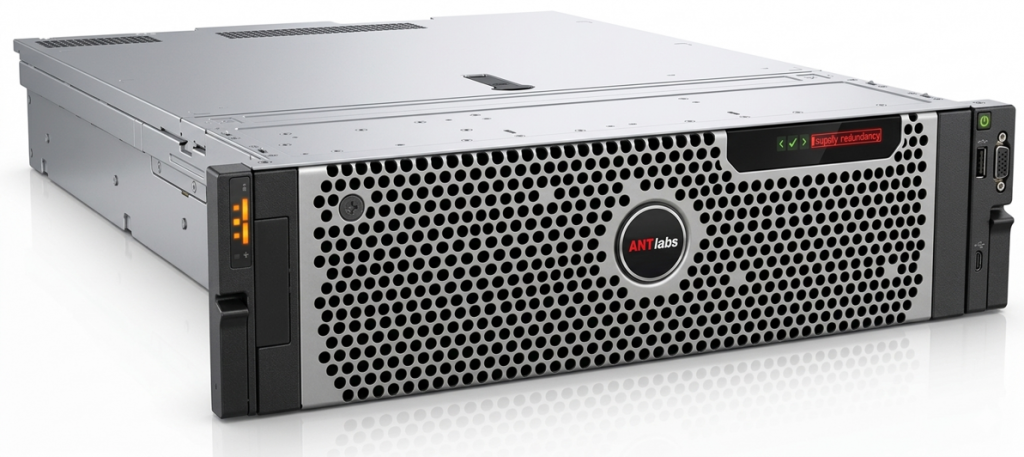
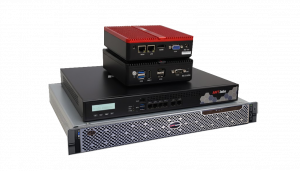
    Available from 1 May onwards, SG Pro 5410 supersedes SG Pro 5400 with native 10GBase-T copper ports, a 1400W PSU, and up to 1.5x the performance for hotel WiFi solutions and other demanding network environments.

    We are pleased to announce the availability of the new SG Pro 5410 from 1 May 2026 onwards.

    The SG Pro 5410 is now the flagship model in the SG Pro range, formally superseding the SG Pro 5400. This platform refresh marks the next step in the SG Pro lineup, while maintaining the same ASP and SG5 feature set that customers and partners are already familiar with.

    With performance tuning and continuing optimizations in both hardware and software, the SG Pro 5410 can deliver up to 1.5x the performance of the SG Pro 5400. Compared with the SG Pro 5400, the SG Pro 5410 is also positioned to deliver faster web response and improved responsiveness in demanding environments, making it the latest flagship option for deployments that demand fast, responsive web performance on networks handling up to 30,000 concurrent users on a single server.

    AI-generated perspective image for illustrative purposes only. Kindly refer to datasheet for actual view.

    A key hardware advantage of the SG Pro 5410 is its native 10GBase-T copper ports, allowing direct 10GbE copper connectivity without the need to purchase separate copper transceivers. This provides clearer 10GE positioning and makes deployment planning simpler for environments using copper-based 10GbE connectivity.

    As part of this refresh, the SG Pro 5410 introduces updated hardware, including a 1400W PSU, while retaining identical ASP and SG5 feature sets to the SG Pro 5400. This allows customers to move to the latest flagship SG Pro model without changes to software capability or pricing structure.

    From 1 May onwards, the SG Pro 5410 will replace the SG Pro 5400 for new opportunities, reflecting ANTlabs’ continued investment in innovation and R&D to support evolving requirements across hotel WiFi solutions, hospitality groups, world-class airports, sporting venues, and other large-scale network environments.


    Talk to our team:
     hospitality.antlabs.com/enquiry


    Learn more about the SG 5 Pro series

    SG 5 Update #16

    This update fixes the PMS guest login issue where the Matching First X Characters has been configured but the downstream guest fails to login with the first X characters of the guest name/number.

    Release Date: 6 March 2026
    Package Name:16.SG5000_base-sys-hotfix-20260305-01.pkg
    MD5 checksum: 9f3e677de07b1479875b9e9fdb3e70aa (updated 20 Apr 2026)
    File size: 322 KB

    SG 5 Update #15

    This update adds the following enhancements:

    • Updated the default SSL certificate
      • The new certificate expires on February 8, 2027 at 23:59:59 GMT
    • New Mariott PMS (FOSSE, FSPMS) support
    • Admin GUI-based console CLI access (System > Console)
      • Note: for this feature to work from an ASP-accessed Gateway Admin GUI, ASP 2.8.0 is required
      • Refreshing the System > Console page will terminate the CLI login session. If you need to hold the CLI login session, you will need to dedicate the CLI login session to one browser tab, and open the other menu items in other browser tabs.
    • Enhanced security
      • Enhanced SSH security (CVE-2025-61984, CVE-2025-61985)
      • Enhanced the safety of the Port Forwarding feature
        • Admin GUI to recommend numbers from 10000 to 20000 to be used as the listening port in new port forwarding rules to stay clear of port numbers commonly used by the system
      • RADIUS authentication test page to hide entered password in the authentication log listing
    • CLI enhancement
      • Improved scp user experience
        • Removed a redundant warning message
        • Added a progress indicator to show the status of the file transfer

    This update adds the following bug fixes:

    • Fixed Fidelio/JDS-SM custom message hooks not running
    • User setting middleware update
      • Prevent high CPU usage by adding some pause before service restart
    • Admin GUI fixes
      • Account editor panel
        • Should not have Add Plan option
        • Plan select dropdown box should display plan names with special characters properly
      • Admin Access page
        • Fix missing network address listing after saving the “Limit users accessing this admin system to these Network Address / Subnet Mask pairs” option
    • Prevent a rare routing issue (only for some gateways) where LAN IP’s subnet route interfere with other required routes
    • Prevent a cron.daily No such file email message from being sent every night. If SMTP Server Settings is properly configured, the email message will get delivered to the recipient every night.


    High Availability (HA) Requirements

    This update is HA-compatible

    • If the connected slave unit is running Update 13, 14, or 15, this update will proceed.
    • This update will attempt to update the connected slave unit if the connected slave unit is running Update 13 or 14.
    • If the connected slave is outside of 13, 14 or 15, the update will stop. The slave must be isolated, individual nodes updated to the required same version, and then re-paired.

    Release date: 22 January 2026
    Package name: 15.SG5000_base-sys-bulk07-20260125-01.pkg
    MD5 checksum: ab948346da594a29df280f1e79d2715e (updated 20 Apr 2026)
    File size: 39 MB

    ASP 2.0 Update #8

    Enhancements/Changes

    • • Updated core platform components and supporting libraries to improve security, stability, compatibility, and long-term maintainability.
    • • Added a new Allow Post Check option for the SkyTouch REST API PMS integration.
    • • Enhanced EzScan to capture and process Seat Number and additional scan data.
    • • Added Seat Number information to EzScan Reports and Analytics.
    • • Improved the built-in and custom portals so that the Posted Room No. field is displayed only when applicable to the selected guest authentication method.
    • • Added more customization options for editable portals, including:
    •         • Logo positioning
    •         • Background positioning
    •         • Background color configuration
    • • Enhanced the portal File Manager to allow supported files to be edited directly.
    • • Improved multi-language support for portal sliders and advertisement components, including URL and scheduling information.
    • • Simplified Global Plan configuration by removing the Volume Limit toggle.
    • • Enhanced tunnel-related functionality for improved connectivity and operation.
    • • Added MEWS PMS support for guest departure processing.
    • • Improved system security by disabling unnecessary ICMP timestamp responses.
    • • Improved synchronization and management of custom portal images, URLs, and scheduling information.

    Bug Fixes

    • • Fixed an issue where navigating to the Session Report after performing a search under a Global Account could result in an error.
    • • Fixed missing information in the Reports and Analytics page.
    • • Improved web server security by preventing unintended access to protected configuration files and reducing unnecessary server software information exposure.
    • • Updated SMTP handling for AWS deployments to support environments where SMTP port 25 is restricted.
    • • Improved the performance of retrieving purchased transaction information.
    • • Updated file-saving confirmation messages to make them clearer and more accurate.
    • • Fixed several VLAN configuration and validation issues, including errors when adding or editing VLANs.
    • • Fixed an issue where the EzCast server health status was not updated correctly.
    • • Improved scheduled report generation in redundant ASP deployments.
    • • Fixed an issue where user time information could be displayed incorrectly in certain forms.

    ASP VERSION: 2.8.0
    RELEASE DATE: 20 Jan 2026