ANTlabs Introduces ANTlabsEzCast at HITEC Toronto 2023

    Enabling Digital Services and Elevating Guest Experience with Advanced Casting Solution for Hospitality

    [Toronto, Jun 27 2023] – ANTlabs, a pioneering provider of advanced network solutions for the hospitality sector, is pleased to launch ANTlabsEzCast, an innovative casting solution designed specifically for hotels. “As internet traffic continues to surge with streaming services dominating content consumption, ANTlabsEzCast enhances the guest experience by seamlessly integrating secure access to individual room TVs,” says Wee-Tuck, Teo, CEO of ANTlabs.  “With ANTlabsEzCast, we aim to empower hotels to launch digital services like casting that mirror the comforts and convenience of home and the luxury of utilizing the large-screen TV.”

    According to recent statistics, streaming now accounts for more than 60% of global internet traffic, making it the dominant form of content consumption. In response to this growing trend, ANTlabsEzCast allows hotels to cater to the evolving needs of tech-savvy hotel guests. Guests can easily pair their mobile or Wi-Fi-enabled devices to the in-room TV via QR Code or via browser authentication.  With the ability to transform large-screen TVs into powerful work or entertainment hubs, ANTlabsEzCast provides guests with a truly engaging digital experience. Privacy and security are also ensured as no credentials are stored on the TV.

    ANTlabsEzCast delivers a cost-effective standalone solution with cloud management and on-premise gateway control. When paired with ANTlabs gateways’ onboard Advanced QoS and application-shaping technologies, hotels can be assured that the surfing speeds do not degrade significantly with the additional streaming internet traffic. Furthermore, it offers a superior technical advantage by eliminating multicast traffic overhead. This is achieved by creating a private network between the end user’s devices and associated Chromecast devices.

    Benefits of ANTlabsEzCast for hotels and guests:

    • – Unmatched in-room experience that drives brand loyalty and delights guests
    • – Cost-effective solution with cloud management and on-premises gateway control
    • – Effortless content casting for guests, eliminating the hassle of HDMI cables
    • – Ease of deployment and monitoring for IT Managers, minimizing troubleshooting
    • – Centralized reporting and cloud-based configuration through a unified dashboard

    ANTlabsEzCast offers competitive pricing and low operating costs, making it the most cost-effective choice when combined with High-Speed Internet Access (HSIA) services.

    ANTlabsEzCast will be showcased at the prestigious HITEC 2023 event in Toronto, where industry leaders and IT professionals convene to shape the future of hospitality technology. The official launch of ANTlabsEzCast is scheduled for June 27th, with interested customers and partners gaining access to this innovative solution starting in Q3 2023. ANTlabs invites technology enthusiasts and industry professionals to explore the forefront of in-room entertainment and experience ANTlabsEzCast.

    ……………………………………

    About ANTlabs Pte Ltd.

    Established in 1999 and headquartered in Singapore, ANTlabs is a market-leading provider of innovative networking solutions for the hospitality, large venues, telcos, and ISP industries. ANTlabs helps our customers deliver high-quality, high-touch, and highly reliable digital services to their guests and users, driving revenue growth and operational efficiency. ANTlabs Pte Ltd offers a wide range of networking solutions, including on-prem network gateways, cloud-based Wi-Fi services management platforms, bare metal appliances, and virtualized telcos network infrastructure solutions through in-house R&D. With resellers worldwide including North America, Europe, the Middle East, and Asia-Pacific, ANTlabs has established itself as a trusted market leader.

    Media Contacts
    Kwang Tat, ANG
    ANTlabs Pte. Ltd.
    angkt@antlabs.com

    ……………………………………

    Photo by Bui Howard
    ASP 2.0 Update #4

    Enhancements

    • – Added Transaction Report and Revenue Report for Global Account and Global Code
    • – Enhanced the Global Code GUI to generate a single code
    • – Enhanced the Global Account/Code list not to call external API for each record to get data
    • – Added option to delete expired Global Accounts/Codes
    • – Added Download function to download Global Accounts/Codes
    • – Changed column name from “Expected End Time” to “Valid Until” in Global Account/Code list.
    • – Added Remember Org ID option in SSO login page
    • – Added Physical IP Address column in Assets > Gateways List
    • – New option in built-in templates to add a second logo for provider branding in the page footer
    • – Added default error for form user’s invalid email verification link
    • – Enhanced equipment add/edit/delete/move function not to rollback if admin log insertion failed.
    • – Allowed to create admin level 2 – 99 for all organizations
    • – Allowed to create the same admin email under different organizations
    • – Improved the site duplicate performance when site has big portals
    • – Allowed to upload .svg format for logo, backgraound, slider images in portals

    Bug Fixes

    • – If site has dedicated cloud gateway, keep existing cloud gateway assigned to site even all equipments are removed from site
    • – Fixed editable custome portal uploaded logo/banner images are not saved
    • – Fixed permission check for Portal Edit icon, Global Account Add button, Site Edit icon and Allocate buttons in overview page
    • – Change minimum upload/download bandwidth value from 0 to 1 in each QoS class
    • – Fixed a portal resources synchronization failure that occurs when the portal size is 800 MB.
    • – Fixed issue when restoring gateway configurations, if the gateway is unable to report its status to ASP, the restore status stuck with the message ‘Restore request initiated. Please check again later”
    • – Fixed missing organization name in organization license report email
    • – Fixed discrepancy between the number of records specified and the number of records shown in Global Account list GUI
    • – Fixed search issue in Global Accont/Code list.
    • – Fixed search issue in Transaction Report
    • – Fixed 500 server error in Gateway License
    • – Fixed permission check in Site Management > Bandwidth menu
    • – Fixed the login redirection issue that can cause a 404 not found error
    • – Fixed high CPU utilization caused by local datetime update cronjob
    • – Fixed the issue with the total value of new users in the data table. The problem was that the calculation didn’t include the last row.
    • – Fixed missing module which can cause tunnel server connection check failure
    • – Fixed session report that does not show records on some dates when the start delay time is huge
    • – Fixed issue where the ‘First Login Time’ was not updated when a user logged in with a global account or code
    • – Fixed issue where ASP logo was hidden in some screen sizes
    • – Fixed Global Code table header and data column not matched when logged in as view-only admin
    • – Fixed portal logo partially hidden in Macbook Devices
    • – Fixed custom portal success, error and login pages selection lost if form is refreshed

    APIs

    • – Added new API: Organization License GET to retrieve information about Organization License. This API can be used to obtain details such as login license limit, global account license limit, modules allocated to organization. Additionally, it provides usage values.
    • – Added new API: Site License GET to retrieve information about Site License. This API can be used to obtain details such as login license limit, webfiltering license limit, modules allocated to site. Additionally, it provides usage values.
    • – Enhanced Global Code Add API to allow to generate single code

    ASP VERSION: 2.0.4
    RELEASE DATE:29 May 2023

    SG 5 Update #6

    This update updates the default ezxcess.antlabs.com SSL certificate. New expiry date is 13 April 2024.

    Release Date: 22 Mar 2023
    Update File Name:06.SG5000_base-hotfix-certificate-202300320-01.pkg
    File Size: 22 KB
    MD5 Checksum: 5ff999f0c4c5b6e1211d5f44c5cdfca9

    SG 4 UPDATE #49

    This update updates the gateway’s default (ezxcess.antlabs.com) SSL certificate. The new SSL certificate’s expiry is 13 April 2024.

    Update Release No. 49
    Release Date: 22 Mar 2023
    Update File Name: 49.SG4000_base-hotfix-certificate-202300320-01.pkg
    (md5:  c5dae461e258675d2060701cb140ec6f)

    IG 4 Update #49

    This update updates the gateway’s default (ezxcess.antlabs.com) SSL certificate. The new SSL certificate’s expiry is 13 April 2024.

    Update Release No. 49
    Release Date: 22 Mar 2023
    Update File Name: 49.IG4000_base-hotfix-certificate-202300320-01.pkg
    (md5: 5e81ed6330be4ecc04e28e909423b722)


    CapPort Support on ANTlabs Gateways

    Improving Captive Portal Detection and Venue Published Information for better visibility

    Captive portals are commonly used by public Wi-Fi networks to restrict access to the internet until the user agrees to certain terms and conditions or authenticates successfully. While captive portals are necessary for many public Wi-Fi networks, they can be frustrating for users who are unable to connect to the internet until they have completed the login process.

    Frustrations can stem from captive portals not loading fast enough or freezing, and some login methods can be lengthy or complicated. Thankfully, ANTlabs gateways provide a plethora of seamless login methods, including social media login, SMS OTP, PMS integration, Hotspot 2.0, etc to suit many usage scenarios. CapPort support on ANTlabs gateways offers an elegant solution to the other aspect of the problem, while providing improved captive portal detection and venue published information.

    Improved Captive Portal Detection

    ANTlabs gateways support the use of DHCP option 114 to indicate the captive portal API URL during IP address assignment. This means that supported devices can immediately fetch the API content after connecting to the network, which prompts the user to log in if the network is identified as captive based on the API response. There is no need to redirect or intercept the initial web requests that would trigger security warnings in modern browsers or delay the delivery of captive portals.

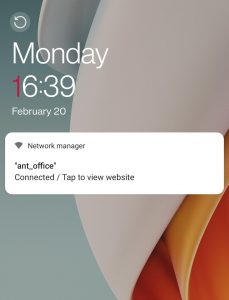
    In other words, CapPort support on ANTlabs gateways enables faster and more accurate reliable detection of captive portals, and greatly improve the user experience and reduce frustration.  The diagram on the left shows an example of an Android phone’s locked screen showing the visual cues to allow the user to click the captive portal URL.


    Venue Published Information for Better Visibility

    In addition to improving captive portal detection, CapPort support on ANTlabs gateways also enables venue published information. Without this feature, after a user is successfully authenticated, they are free to move to other web content and the venue will lose the opportunity to engage with the customer further.

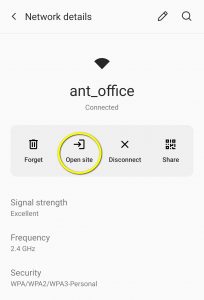
    When a CapPort message is displayed on a device using captive portal API, the user can interact with it to immediately open their internet browser and navigate to the Venue Info URL at any time. This feature is particularly useful in scenarios such as staying at a hotel, where guests may want to easily access information about services or amenities. By simply clicking on the system message, users can access venue information, including spa, restaurant hours or any promotions offer. With the addition of location-aware websites, the guest journey becomes even more intuitive and seamless.  The diagram on the right shows the user interface where a user can find the venue URL by clicking on the “Open Site” icon.

    It is worth noting that more mobile devices are beginning to support CapPort feature, specifically Apple (iOS 14 and macOS Big Sur) devices and Android 11 onward. 

    Conclusion

    In conclusion, CapPort support on ANTlabs gateways is a powerful tool for improving captive portal detection and providing venue published information. By using DHCP option 114 to provide the captive portal API URL and including the Venue Info URL in the CapPort message, CapPort support streamlines the process of connecting to public Wi-Fi networks and provides users with easy access to important information about the venue. As a result, CapPort support can lead to increased customer satisfaction, repeat business, and revenue for businesses.

    SG 5 Update #5

    This update includes the following fixes:
        • Web server upgrade
            • Enhance stability in rare situation of receiving very long URLs
            • Support proxying to a target domain name with underscore character _

    This update also increases the maximum file upload size of the web server to support uploading of larger patch package files.

    SG 5 Update Release No. 5
    Release Date: 24 Feb 2023
    Update File Name: 05.SG5000_base-hotfix-nginx-20230221-01.pkg
    File Size: 1.4 MB
    MD5 Checksum: 2fde3f01976947d4fb5a39dc0167b52b

    ASP 2.0 Update #3

    ENHANCEMENTS/CHANGES

    • Allow admin accounts (admin level > 100) to use same email address in different organizations. Currently, email is unique across all admins.

    • Note: for organization super-admin (admin level = 100), email address is still unique.

    • Show only relevant valid values in Admin User edit page’s authentication type dropdown, excluding authentication types not enabled for the logged-in user’s organization.

    • Increase plan duration validation to allow up to 9999 days

    • Automatically assign new site to its organization super-admins. Also assign all sites belonging to an organization to its organization super-admins when the organization super-admin accounts are created.

    • Show cloud icon for ACG sites in left panel to differentiate gateway from ACG sites

    • Update Web Filtering GUI to support 5 profiles

    • Note: gateway must be patched up-to-date to enable this feature. Please check SG 5 Update Release Notes.

    • Remove display of software serial numbers for on-premise and cloud gateways.

    • Include Web Filtering, QoS Rules and Plan App Shaping in the Site Duplicate feature

    NOTIFICATIONS

    • Categorize notifications email as [ALARM], [ALERT], [OK], [INFO], [REPORT], [CODE], [PASSWORD]

    • Allow admin user to configure to receive or not receive emails and their triggers

    • For service provider, the Service Provider Settings page provides options to select gateway state change, site/organization license state change, and/or organization license usage monthly report is ready.

    • For organization super-admin, the Site Show > Notification > Popup provides options to select gateway state change, and site license state change

    • New notification option in Organization edit panel. If it is on, organization super-admin will receive email when organization license state changes. Default value is on. Organization super-admin can now choose to turn off email notifications.

    SAML SSO LOGIN

    • Fix SAML SSO login failing to retrieve signature from response

    • Admin log to display link to SSO login XML response for both successful and failed login

    FORGET PASSWORD

    • Send multiple reset password links if same email address is registered in different organization.

    • Entering invalid email address should redirect to a message informing user a reset password email has been sent

    ASSETS > CLOUD GATEWAY

    • New form to key in Public IP and Shared Secret of cloud gateway

    • Display AP configuration instructions upon successful cloud gateway site creation

    PLAN EDITING

    • Fix plan page to default to None QoS class if existing QoS class is not found, instead of showing server error

    BUILTIN PORTAL EDITING

    • Fix thumbnail generation showing previously selected template, not the current one

    • Prevent downstream user from clicking social login button multiple times. This fixes the issue where multiple authentication logs are logged for a single login attempt.

    • For SkyTouch /CONNECT (Events webhook) to show plan selection box to downstream user on successful authentication

    • Fix missing favicon.ico in gateway downstream login page

    • Fix Corporate template show no border in PMS plan selection box

    CUSTOM PORTAL EDITING

    • Fix issue of 504 gateway timeout error showing when big portal is uploaded.

    • Add validation for mandatory welcome, error and success page fields in full custom portal

    • Fix issue where welcome, error and success page settings in full custom portal get lost after the file upload dialog box is opened and closed

    ALL PORTALS

    • New payment method: Bank of Maldives (corresponding gateway update is required; please check SG 5 Update Release Notes)

    • New social login: Apple ID (corresponding gateway update is required; please check SG 5 Update Release Notes)

    • Fix memory limit exceeded issue when big resource is synced down to gateway

    GATEWAY COMMAND COMMUNICATIONS

    • Fix portal resource download command not resuming after gateway is rebooted.

    REPORT & ANALYTICS

    • Fix Transaction and Authentication report paging not working on first load when all sites is selected.

    ASSETS > LICENSES > GATEWAY

    • Include cloud-gateway sites in the site listing. Previously, ACG sites are not shown.

    • Fix wrong ‘Used’ value in Assets > License > Gateways Page

    EQUIPMENT IMPORT

    • Fix 500 server error during equipment import

    • Use timestamp for created datetime and updated datetime to prevent date str format changed when it is opened in excel.

    VLAN IMPORT

    • Fix VLAN import not updating pre-existing VLANs

    CONFIG BACKUP/RESTORE

    • Fix S-series upgraded to v5 not being able to perform config backup

    • Fix sometimes not being able to cancel backup/restore

    • Show error message in GUI if backup/restore is failed in gateway

    • Note: gateway must install SG 5 Update 4 for this to work.

    • Fix restore icon being disabled if backup is duplicated from another site.

    REPORTS & ANALYTICS > LICENSES > LICENSE SUMMARY

    • Fix memory limit exceeded issue when License Usage is refreshed

    • Optimize License Summary page not to call server multiple times

    • Fix site selection box showing sites not assigned to the current login user

    • Fix license usage download not being able to complete

    GLOBAL ACCOUNT/ROAMING

    • Fix Global Account license used value not counting roaming account

    • Fix Global Account relogin not working.

    USER PORTAL

    • Fix email login not working

    • Fix facebook login showing App not active

    • Fix logins resulting in ever increasing size of a log file

    OTHER FIXES

    • Fix plan list page not to show plans if selected site is not assigned to current logged-in user

    • Fix Release Notes for accurate ordering of the software updates

    • Fix Profile Edit form to check old password if password is changed.

    • Fix portal duplicate to show error if modules are not enabled in destination site

    • Fix admin add page not to fail while saving new admin if organization image is not found

    APIS

    • Add new Session GET ALL API for v1

    • Fix critical error in Transaction GET ALL V2 API when listing transactions for all site groups

    • Fix critical error in Users GET ALL V2 API when listing transactions for all site groups

    • Fix site token incorrect error in Session GET ALL API when sessions are listed by site group name

    • Fix Organization Add/Edit API: Radius timeout validation not working

    • Fix Organization Edit API: internal server error on updating organization with SAML authentication

    ASP VERSION: 2.0.3
    RELEASE DATE: 12 Jan 2023

    SG 5 Update #4

    This update includes the following enhancements:

    • > Support for SkyTouch /CONNECT PMS (Events Webhook)
    • > Multi-WAN load-balancing support for WAN DHCP configuration
    • > View and download various logs via web-admin GUI
    • > Performance tuning
      • – PHP web process manager configuration update
      • – Network QoS service upgrade
    • > Security enhancements
      • – Remote Access service upgrade for more secure ciphers and algorithms
      • – Firewall enhancements for traffic directed at the gateway
      • – System monitoring service update
    • > Kernel upgrade for better performance
    • > System component upgrades
      • – Web server upgrade for proxy services
      • – Speed up frequency of syncing ASP-managed settings to gateway
      • – PAN service upgrade
    • > Dashboard shortcuts
      • – Remove short cuts that are no longer used — Plans, Locations
      • – Add new shortcuts — ASP, Updates
    • > API upgrade

    This update includes the following fixes:

    • > HA-related fixes
      • – Fix out-of-box SG5 v5 appliances not being able to set up HA. HA service now uses unicast for communication between nodes.
      • – Fix Micros PMS user settings not failing over to HA backup node
      • – Ensure HA nodes do not lose communication with each other after snapshot restore
        • > Physical appliances’ snapshot restore fix so HA link-present snapshot restore can complete without losing HA communications between the nodes
        • > CLI prepare_for_pairing and HA module updates
          • – For vSG Express/Pro, HA link-present VM snapshot restore is not supported. It is recommended to first break the HA link, snapshot restore the nodes, then use CLI prepare_for_pairing or GUI prepare for pairing to prepare the backup node to join the active node
    • > Micros PMS (1700/2000/3700/4700/8700) fixes
      • – Fix not deleting outdated room status when Daily Guest Status Cleanup is enabled
      • – Fix “Computer Inquire” Inquiry Method not using the Computer Inquire method during second phase of the two-step posting
    • > Fix application shaping service to emit proper messages during startup
    • > Remove subnet control from LAN IP GUI
    • > Fix some Remote Syslog settings not saved correctly
    • > Admin framework fix so view-only user is not allowed to reboot system
    • > ASP-related fixes
      • – Fix ASP sync component not syncing the plan’s application shaping rules’ categories correctly
      • – Fix ASP server configuration component not updating the accounting server configuration

    The gateway will automatically reboot upon successful application of this update.

    SG 5 Update Release No. 4
    Release Date: 13 Jan 2023
    Update File Name:04.SG5000_base-sys-bulk03-20220808-01.pkg
    File Size: 63 MB
    b39139506c4bedfa4e5077d0827be840 (build 27)

    ACS Update 16.12

    This update adds the following enhancement:
         • Remove MIME type and file extension filter from file selector prompt of custom portal editor to allow upload of any file type

    This update fixes the following issue:
         • Idle timed-out user logs in again and encounters 404 Not Found when accessing some pages, e.g. Roaming Session.

    ACS Version 1.16.12 (Update 16.12)
    Release Date: 31st October 2022