 One thing that every service provider aims for is to exceed customer expectations. Customers are now more demanding and they know that they have more options available to them, so it has become paramount for establishments to dig deeper on what they think might work to keep them from running to their competitors. This is one of the reasons why free WiFi is as omnipresent as coffee shops are in metropolitan areas—it serves to attract and retain customers in the area.
For service providers, each day in service delivery is unique, therefore one must anticipate what customers need (or probably appreciate) and be ready for any eventuality so solving problems would be quick and smooth. Relevant customer insights equip you with the knowledge of who your customers are, what they like, why they go to your establishments, and what might be the reasons that will make them stay or come back.
Providing reliable WiFi connectivity to your guests (whether you offer it for free or not) while gaining unique, user-verified data about them is what the User Form Authentication feature enables you to do—and it is without incurring additional cost that usually comes with customization. With user form authentication, you can collect information you want from the customers themselves.
User Form Authentication
The user form authentication method requires downstream users to fill in a form to access the Internet. There is an option to verify the identity of the user via SMS or email and gateway administrators can enable it upon setting up the form. The data collected is then presented in the web admin GUI and sent to ANTlabs Cloud Service (ACS) if the gateway is connected to ACS, where further analytics and presentation can be viewed.
How to Design Effective User Forms
Forms are good for collecting information, but here’s the catch: people are hesitant to give out information, especially when they feel that you are asking too much or make them think too much for replies for each field. It is therefore ideal to have a simple form that is not daunting for first time users to fill up. The sign-up process must be as quick and painless as possible. A well design form encourages good WiFi sign-up rate. Here are some best practices to consider when designing your establishment’s authentication form:
1. Keep It Simple
Set your goals and identify what data required to achieve these goals. Only ask what is required. Eliminating unnecessary fields increases sign up rate.
The ANTlabs authentication form provides the flexibility to select from the default fields and create up to 5 custom fields. Thus, enabling businesses to collect unique bespoke data to meet your business goals.
2. Group the fields and use logical sequencing
With the drag and drop capability, related fields can be grouped together logically from a user perspective.
3. Set optional and mandatory fields
It’s highly recommended to avoid optional fields. However, if required, you should uncheck the box in the mandatory column. All mandatory fields will an asterisk (*) beside their labels.
4. Protect your brand – ensure collected data are accurate
Data validation process (email / SMS) can be easily enabled in the form. This feature not only facilitates data protection but also reduces the cost to handle invalid customer data.
5. Brand your welcome page
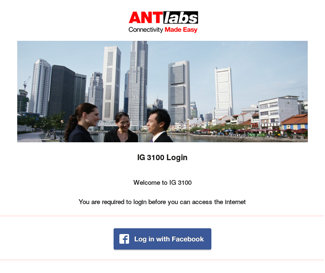
The welcome page is an excellent platform to connect with your users and showcase your brand. Multiple templates available to give you a quick head start, while you can focus to create your own unique brand experience. Customizable areas include: logo, background image, promotional web banners, color and font settings.
6. Use Terms and Conditions to protect your business
You will need your user to agree with the terms and conditions to use your WiFi. This will spell out where your business’ liability ends in a situation when there is a security breach. If a user engages in illegal activity in your network, your business shall be protected from the repercussions of said activity.
7. Protect your form to block spam
You can easily enable CAPTCHA in your form to capture only relevant information from humans. However, do note that it may affect the sign-up rate as users can get frustrated after one or two failed attempts.
8. Test Your Forms
Randomly request some of your colleagues to go through the form you created. Their feedback will give you an idea if your form is effective or easy to use.
