Improving Captive Portal Detection and Venue Published Information for better visibility
Captive portals are commonly used by public Wi-Fi networks to restrict access to the internet until the user agrees to certain terms and conditions or authenticates successfully. While captive portals are necessary for many public Wi-Fi networks, they can be frustrating for users who are unable to connect to the internet until they have completed the login process.
Frustrations can stem from captive portals not loading fast enough or freezing, and some login methods can be lengthy or complicated. Thankfully, ANTlabs gateways provide a plethora of seamless login methods, including social media login, SMS OTP, PMS integration, Hotspot 2.0, etc to suit many usage scenarios. CapPort support on ANTlabs gateways offers an elegant solution to the other aspect of the problem, while providing improved captive portal detection and venue published information.
Improved Captive Portal Detection
ANTlabs gateways support the use of DHCP option 114 to indicate the captive portal API URL during IP address assignment. This means that supported devices can immediately fetch the API content after connecting to the network, which prompts the user to log in if the network is identified as captive based on the API response. There is no need to redirect or intercept the initial web requests that would trigger security warnings in modern browsers or delay the delivery of captive portals.
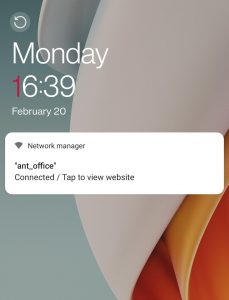
In other words, CapPort support on ANTlabs gateways enables faster and more accurate reliable detection of captive portals, and greatly improve the user experience and reduce frustration. The diagram on the left shows an example of an Android phone’s locked screen showing the visual cues to allow the user to click the captive portal URL.
Venue Published Information for Better Visibility
In addition to improving captive portal detection, CapPort support on ANTlabs gateways also enables venue published information. Without this feature, after a user is successfully authenticated, they are free to move to other web content and the venue will lose the opportunity to engage with the customer further.
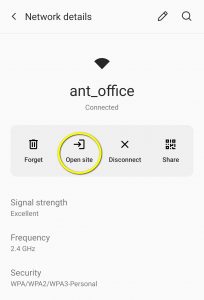
When a CapPort message is displayed on a device using captive portal API, the user can interact with it to immediately open their internet browser and navigate to the Venue Info URL at any time. This feature is particularly useful in scenarios such as staying at a hotel, where guests may want to easily access information about services or amenities. By simply clicking on the system message, users can access venue information, including spa, restaurant hours or any promotions offer. With the addition of location-aware websites, the guest journey becomes even more intuitive and seamless. The diagram on the right shows the user interface where a user can find the venue URL by clicking on the “Open Site” icon.
It is worth noting that more mobile devices are beginning to support CapPort feature, specifically Apple (iOS 14 and macOS Big Sur) devices and Android 11 onward.
Conclusion
In conclusion, CapPort support on ANTlabs gateways is a powerful tool for improving captive portal detection and providing venue published information. By using DHCP option 114 to provide the captive portal API URL and including the Venue Info URL in the CapPort message, CapPort support streamlines the process of connecting to public Wi-Fi networks and provides users with easy access to important information about the venue. As a result, CapPort support can lead to increased customer satisfaction, repeat business, and revenue for businesses.
How to deploy ANTlabs Advanced QoS/QoS+ and dramatically improve your Wi-Fi network
Are users complaining about slow WiFi speeds? Do you want to provide your guests, or staff with all the bandwidth they need?
Are you struggling to meet bandwidth requirements for guest WiFi, and cringing at the prospect of asking Management for yet another budget request to buy more internet connections? Wished you read this article before the last budget request?
Have you been asked to implement QoS on your network but don’t know where to start? This blog post will explain how Advanced QoS can help you with all the above. Let’s get started!
Basic QoS 101
Quality of Service (QoS) can help you by providing better control and management of your traffic. QoS can improve your user experience by giving certain types of traffic priority over others. This can be especially useful if you have time-sensitive applications or need to manage large amounts of traffic.
Without QoS, your network would be a free-for-all where every application competes for bandwidth equally. That might work fine for small networks, but as soon as you start adding more users and applications, things can get bogged down quickly. With QoS, you can give priority to the traffic that matters most to your business. For example, you can prioritize voice traffic over email or video streaming. Alternatively, you may decide that social media usage like YouTube, Facebook, or Twitter is banned in your network.
However, not all QoS features are built equal. You need to understand that simple QoS solutions don’t help much, if at all. For example, simple rate-limit, or device-level QoS control targets individual devices. It has no idea what applications are being used, who the user is, or how many devices within the same room are hogging all the bandwidth. A small group of users can monopolize the network. Implementing QoS can be complex, but the benefits are worth it.
What is Advanced QoS / QoS+ and how does it work?
Save money and time, while improving the end-user experience: Advanced QOS (AQoS) and Advanced QoS Plus (AQoS+) module from ANTlabs control who gets priority, where, and when. No need to buy expensive network equipment, and spend days installing and troubleshooting, as both are software modules add-on to our ANTlabs gateways. It is easy to deploy and optimizes throughput over a network with a multi-stage QoS engine and customizable application shaping. It enables you to grant VIP users more bandwidth, speeds up those applications that need them (e.g., VoIP or IPTV), and it provides comprehensive control over the quality of your network. The IT administrator just needs to define the locations, and QoS plans that is to be applied to different user groups, and simply configure on a graphical web-based interface on our managed Cloud Wi-Fi platform (ASP/Cloud ASP).
ANTlabs Advanced QoS / QoS+ is a powerhouse
With more than 20 years of R&D and industry experience for visitor-based networking in hospitality and large venues, ANTlabs has purpose-built the QoS engine to optimize hospitality Wi-Fi, and offer world-class airports and sports venues superior guest Wi-Fi solutions.
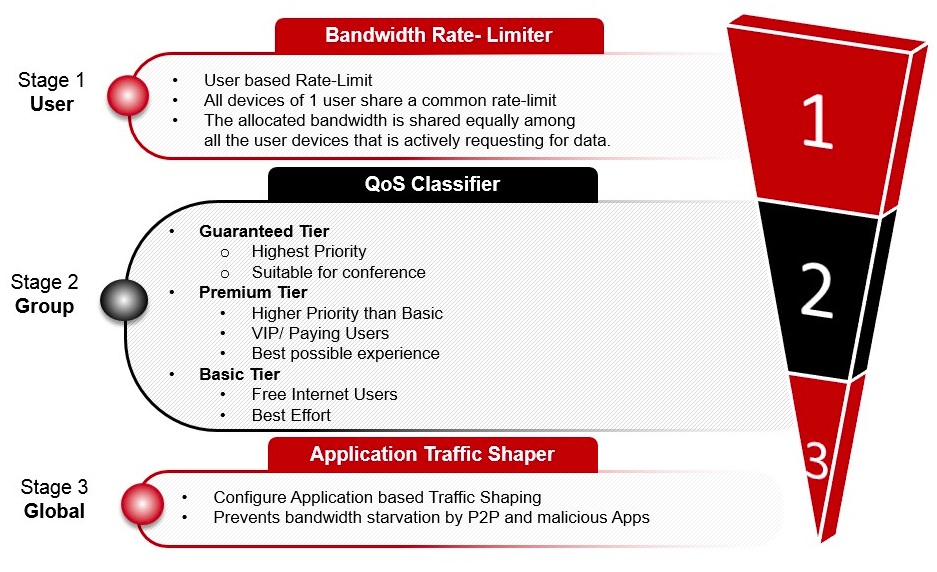
One of the unique features of the ANTlabs Advanced QoS 3-stage engine is its capability to allow multiple devices to share a single bandwidth rate limit per user. For example, you wish to allocate 10MB per guest or staff. Each user will only use up this amount of bandwidth among all his/her active devices, and it will be shared equally amongst them.
With the Advanced QoS 3-stage engine, bandwidth utilization can be maximized by creating differentiated classes of services for different groups of users.
All user traffic goes through the Advanced QoS 3-stage engine:
Stage 1. As we mentioned earlier, the first stage engine is unique to ANTlabs, and applies bandwidth rate limit to the individual user instead of device-level. Together with authentication, this innovation allows different users to be treated according to their VIP status or needs, instead of blindly applying one simple limit to a device.
Stage 2. This second stage engine defines different QoS Tiers (Guaranteed Tier, Premium Tier and Basic Tier) where different user groups can be assigned to the desired tier. Between the tiers, higher or lower priorities are given as to who gets the bandwidth, and the IT Manager can specify the total maximum bandwidth allocated to a tier for better control. In this way, no single group of users can monopolize the whole network and the IT Dept has better visibility and control. Furthermore, the surplus bandwidth from any bandwidth tier, can be temporarily re-allocated to another congested bandwidth tier automatically, optimizing network resources.
Stage 3. In the third stage, global application traffic shaping can be applied to network ports used by applications. This allows the bandwidth used by specific types of applications (of all users) to be controlled further. In this way, more control can be applied so that no application will be starved for network resources. Certain applications’ bandwidth consumption can be suppressed or given more priority to use up the network bandwidth.
Advanced QoS Plus (QoS+) is the latest innovation leap by ANTlabs. It has all the features of the original Advanced QoS module and more! As some applications like BitTorrent evolve to evade port-based application blocking, Advanced QoS+ classifies the applications more accurately based on website categorization without relying on which network ports are being used. This signature-based website categorization is regularly updated to improve accuracy. Another improvement is more fine-grained control for the global application shaping. By allowing you to define QoS policies for different user groups, you can optimize the network further with better accuracy.
For example, you can create a special user group to give priority to streaming services. When you apply this to paying customers or VVIP customers, they will be able to enjoy better quality streaming in their rooms or anywhere in the network. You can also make your network more family-friendly and safer by blocking adult-related, gambling sites or known blacklisted sites.
How does Advanced QoS /QoS+ help improve the user experience?
As far as the users are concerned, they will find that applications will now run better on their devices with Advanced QoS enabled. They may not even notice any slowdown or pausing in their applications, and simply assume more internet connections were added. If you are a VIP user, you will be pleased that even in public areas, you enjoy a faster and better quality of bandwidth compared to guest users. For the management, you can be assured that the existing network resources are well-optimized, and buying more Internet bandwidth can be delayed or dispensed with. In some cases, you may even scale down the number of internet connections, and save costs since network usage has become more efficient.
Conclusion
In conclusion, by deploying ANTlabs’ Advanced QoS / QoS+, you can greatly improve your network performance and ensure that critical applications always have the bandwidth they need. You don’t need a lot of network expertise or expensive hardware to implement. By carefully planning your QoS strategy and implementing it correctly, you can take your network to the next level and please everyone (including the bosses!), leaving you more time to handle other pressing matters.
Make sure to include ANTlabs’ Advanced QoS or Advanced QoS Plus module in your next budget request so that you don’t need to go back to ask for more in future!
The demand for managed Wi-Fi services for MDUs is on the rise worldwide, but standard enterprise-grade Wi-Fi services are rarely the right solutions for residential premises. The answer is a dedicated Wi-Fi feature set that affords residents all the benefits of professional MDU Wi-Fi including security, dynamic quality of service (QoS) management, and personal area networks.
MDUs are characterised by a lot of building tenants often living relatively close together. The need for dynamic quality of service management is important – as is delivering the right security. Add to this that tenants also want to be able to share content over the private Wi-Fi networks inside their unit only. Standard enterprise-grade Wi-Fi management – even in the Cloud – is simply not enough. MSPs (Managed Service Providers) offering managed Wi-Fi service in an MDU environment will benefit greatly from ANTlabs solutions that improve productivity, and boost user satisfaction and operational efficiency.
ANTlabs Pte. Ltd., a proven network technology product and solutions provider for the hospitality, telcos, ISP, and large venues, announces its partnership with Vastcom Technology Limited, the leading one-stop ICT solutions provider in Macau. Vastcom has over a decade of working experience in the hospitality and gaming industries, and its current mission is to assist […]
SINGAPORE, 22 JULY 2021 – ANTlabs Pte. Ltd., an established network technology product and solutions provider for the hospitality industry, announces its partnership with Brantas Ltd., the leading integrator of hospitality technology in New Zealand and The Pacific. Both companies have been in the industry for more than two decades, thus combining long experience and […]
How captive portal login pages improve guest WiFi experience for users
It is 2021, and there are many ways to connect to the Internet. Do we still really need captive portals for guest networks?
What are captive portals? These are the login pages you see before you log in to a guest network (i.e., coffee shop WiFi, hotel lobby WiFi, etc.). Modern mobile devices provide a captive network assistant to detect captive portals. Once a captive portal is detected, the phones will launch a pseudo browser or captive portal mini browsers (CPMB) to load the captive portal page for the user to complete the login process (Source: World Broadband Alliance).
Before the existence of captive portal mini browsers, users needed to connect to an SSID, open one’s browser, and be redirected to the captive portal. This created challenges for end-users, such as browsers giving false security warnings for relatively harmless sites. Aside from that, the lack of browser standards did not produce a smooth user experience—it was a common sight to see broken pages. This not only mars one’s perception of the operator’s brand, but it also makes one question if they are logging in to the correct network. CPMBs were therefore developed and added to devices back in 2014 to enhance security, interaction, and usability for public WiFi hotspot users. Today, captive portals delivered through CPMBs continue to be part of the solution to improve guest WiFi experience.
It’s not just about your brand memorability; captive portal login pages may serve as a reassurance to your guests.
Captive portal login pages allow you to put a brand or face offering the guest WiFi service. Why is there a need to do this? This is the first touch and impression that a WiFi network user sees and experiences, for starters. If the WiFi network experience is fast, smooth and pleasant, by extension, it helps to reinforce good feelings towards the brand or associate the good experience to the brand. As the saying goes: “First impressions matter”.
Another benefit of using captive portal pages is reinforcing your brand stickiness and loyalty. There are two ways customers can have an affinity for a brand: brand stickiness and loyalty. Brand loyalty is when customers actively choose a brand because they resonate with the brand or find utility in its products. Brand stickiness is when you ensure your customers return to your business because you have created a welcoming environment or using your product is so convenient that it helps make their lives easier. Both brand stickiness and loyalty have the same goal—to acquire customers and keep them. Together with a great WiFi experience, it will entice them to keep coming back for sure.
For operators and service providers, branding is an easy experience when using ANTlabs products. ANTlabs captive portal login pages are easy to set up with pre-configured templates, drag-and-drop template editor, and the upload stylesheet feature. These features substantially reduce setup time. When operators deploy hotspots using existing templates and a few modifications such as simply uploading the operator’s logo, login pages are up and running in just a few clicks. You can also add advertising banners on these login pages to remind your guests about ongoing promotions at the venue. Or you can simply post reminders or say a nice welcome message when they see your captive portal.
Aside from the consistent experience, seamless connectivity can make your guests remember your brand and your location. Let your guests connect conveniently by giving them various authentication options. With ANTlabs gateways, there are many ways to allow your guests to connect easily (i.e., social media, complimentary access, user ID & password, access code, MAC-level, PMS authentication and billing, email, SMS, Office 365, auto-login, credit card, account printer, etc.). Each authentication method has its merit and value, and we offer you the flexibility to choose what meets your needs.
Improve guest experience with data and seamless relogin
When your guests choose to log in via social media on the captive portal, they also authorize you to access data that they have marked as public for social media networks like Facebook, Twitter, Instagram, and LinkedIn. With user-provided public information, such as interests, age, or even birth year, operators and service providers can tailor the experience they provide to match the audience they attract or hope to attract.
ANTlabs Cloud Service (ACS) gives drill-down reports on the user demographics of each WiFi location. Aside from these insights, operators and service providers can have a glimpse of their network’s health across multiple sites. If you are running a chain of cafes and co-working spaces, your ACS dashboard will tell you if your café across the island is having connectivity problems—it does not matter if you are on vacation abroad; you will see how your network is faring using this.
Can we let users log in through captive portals once and be done with it so they will not do it over and over again? Yes, you can! Picture this: you log in to WiFi via your favorite café’s network, and then the next day, you go to their other branch, and you automatically get logged in to WiFi there as well without having to key in another access code or sign up via forms. This is easy to implement when using ANTlabs gateways. Operators and service providers can easily make their captive portals work with ANTlabs’ seamless relogin and global roaming features to allow this kind of experience. This way, their VIPs will get the best connection when connected to their guest networks, whichever branch they visit in the world.
Protect your business from legal entanglements through captive portals
Businesses can indemnify themselves from illegal WiFi use or conform to regulatory requirements using captive portal login pages to collect end-user acceptance. Upon logging in to your guest network, you let the guests agree to the terms of use. This is where you can specify that your users agree that your business is not liable for what they are doing online while connected to your network or users granting their privacy permission for data collection and usage. Your captive portal should require them to tick on a checkbox to state that they understand what they are doing and know the possible consequences. Having this will protect not only the users but also your business.
User Data Privacy
ANTlabs recognizes how important user data privacy is, and our products are GDPR-compliant. Whether you use ANTlabs gateways or any of our cloud services and platforms, you are assured that you give your users the power to manage their data themselves through the ANTlabs user portal. Here, not only do you guarantee your guests that their data is safe when they are connected to your network, but you also empower them by giving them the option to remove their data. Thus, you protect them while you protect your business.
CPMBs were made to add a security layer for users. Over time, its use has evolved. The pages vary from a simple login to forms that ask for more information to QR code scanning and launching mobile apps. Unscrupulous entities found ways to exploit user data and disregard privacy, so WiFi-enabled device manufacturers started to enforce ways to protect users.
One way that device manufacturers implemented to protect user privacy is MAC randomization, and another is limiting CPMB capabilities to interact with native apps. In the latest iOS and Android updates, they started to limit what CPMBs can do, so for WiFi hotspots that use captive portals, the WiFi onboarding experience may be disrupted. ANTlabs has developed solutions to adapt and reduce the disruptions caused by these developing situations.
Given these disruptions, are captive portals still necessary? The answer is a resounding yes, especially for operators who offer guest WiFi to countless devices with varying requirements. Captive portals via mini browsers are still the most common and accessible mechanism for users to sign on to the guest WiFi. Furthermore, captive portals protect both the operator and the users.
To ensure that the connectivity is manageable and safe for all users, operators must know who is connected to their network—captive portals allow service providers and operators to do this. Logging to WiFi through captive portals can serve as an agreement that the operator is providing a safe WiFi connectivity service to their guests. In return, the user is expected to follow the terms set by the service provider.
For secured roaming, Hotspot 2.0 does offer an industry-approved way for different mobile devices to connect seamlessly without the use of captive portals. However, unless every single person in the world has enabled Hotspot 2.0 and similar technologies, there is no single way to ensure safe WiFi connectivity if we do without captive portals.
Can we imagine a world with no captive portals for guest WiFi networks? Not anytime soon because the benefits outweigh the mild inconvenience for both operators and users.
Ask us today about how ANTlabs captive portal login works to improve your guest networks.
What is Hotspot 2.0? Hotspot 2.0 is a standard designed to provide a secure and more accessible way for end-users to connect to WiFi hotspots. Developed by the WiFi Alliance, the standard uses 802.11u and 802.1x as a foundation to create a seamless WiFi connectivity experience for users by automating network discovery, registration, and authentication. […]
To provide the best experiences, we use technologies like cookies to store and/or access device information. Consenting to these technologies will allow us to process data such as browsing behavior or unique IDs on this site. Not consenting or withdrawing consent, may adversely affect certain features and functions.
Functional
Always active
The technical storage or access is strictly necessary for the legitimate purpose of enabling the use of a specific service explicitly requested by the subscriber or user, or for the sole purpose of carrying out the transmission of a communication over an electronic communications network.
Preferences
The technical storage or access is necessary for the legitimate purpose of storing preferences that are not requested by the subscriber or user.
Statistics
The technical storage or access that is used exclusively for statistical purposes.The technical storage or access that is used exclusively for anonymous statistical purposes. Without a subpoena, voluntary compliance on the part of your Internet Service Provider, or additional records from a third party, information stored or retrieved for this purpose alone cannot usually be used to identify you.
Marketing
The technical storage or access is required to create user profiles to send advertising, or to track the user on a website or across several websites for similar marketing purposes.

 In addition to improving captive portal detection, CapPort support on ANTlabs gateways also enables venue published information. Without this feature, after a user is successfully authenticated, they are free to move to other web content and the venue will lose the opportunity to engage with the customer further.